1. Purpose and Functionality
The Exposure page is designed to:
- Deliver a centralised view of assessment results
- Highlight security risks and compliance gaps
- Provide historical trends for ongoing monitoring
- Enable rapid navigation to detailed reports
It acts as the primary dashboard for understanding your overall exposure across all assessed devices.
2. Filtering and Data Segmentation
Assessment data can be refined using labels and match conditions:
Match Conditions
- Match all
Displays results from reports containing all selected labels - Match any
Displays results from reports containing at least one selected label - Match exact
Displays only results with the exact same label combination
This filtering system allows precise targeting of datasets, such as specific environments, business units, or device groups.
3. Core Dashboard Components
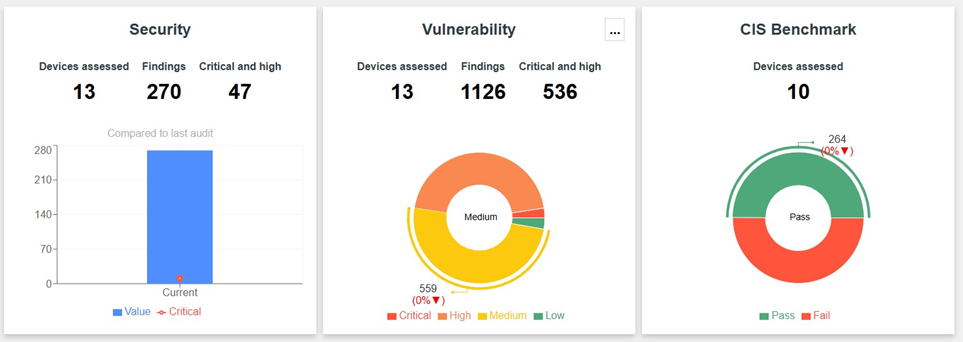
Security Overview
- Displays:
- Total devices assessed
- Total findings
- Critical and high vulnerabilities
- Clicking the chart opens the corresponding reports
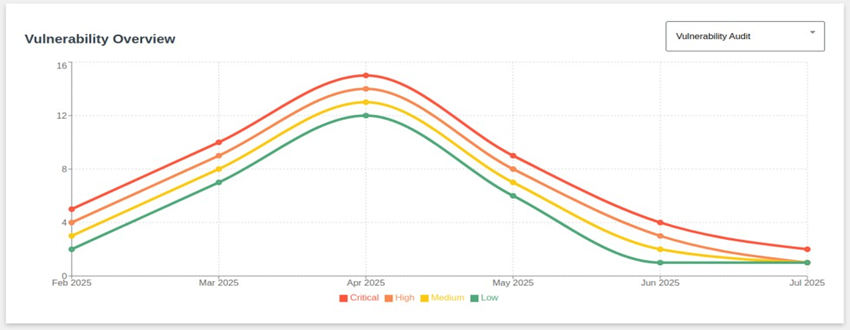
Vulnerability Overview
- Shows vulnerability severity distribution
- Includes percentage change vs. previous assessment
- Supports drill-down into detailed findings
Cisco PSIRT Overview
- Focuses on vendor-specific vulnerabilities (Cisco)
- Accessible via the options menu
- Provides severity breakdown and trend comparison
The Exposure page includes multiple compliance-focused views:
CIS Benchmark
- Pass/fail counts for CIS compliance
- Highlights overall compliance posture
PCI Overview & PCI Severity
- Device compliance status (pass/fail)
- Vulnerability severity for PCI audits
DISA STIG
- Pass/fail counts, findings, and assessed devices
- CAT-based breakdown of failures
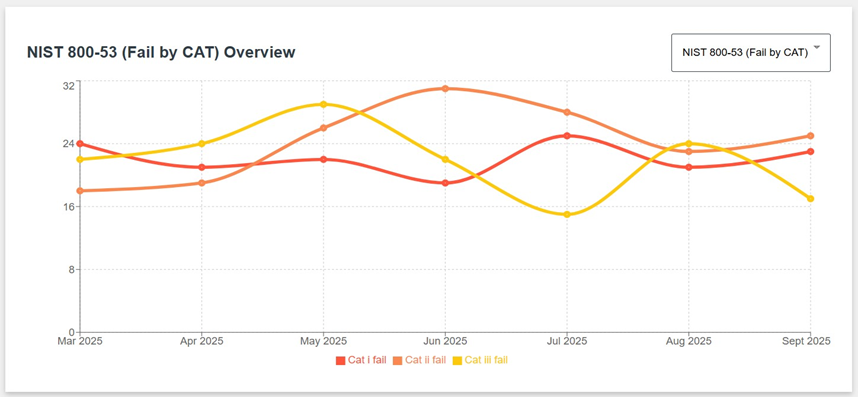
NIST 800-53
- Compliance status and findings
- CAT-based failure analysis
Each dashboard supports:
- Hover-based trend insights
- Click-through navigation to detailed reports
5. Advanced Security Insights
Macro Segmentation Overview
- Identifies deviations from defined whitelists:
- IP ranges
- Services
- Users and privilege levels
- Highlights potential:
- Misconfigurations
- Unauthorized changes
- Privilege escalation risks
Filtering Complexity Analysis
- Detects inefficiencies in network configurations:
- Unused objects
- Disabled rules
- Overlapping or conflicting rules
- Helps improve:
- Security
- Performance
- Manageability
6. Trend Analysis (6-Month View)
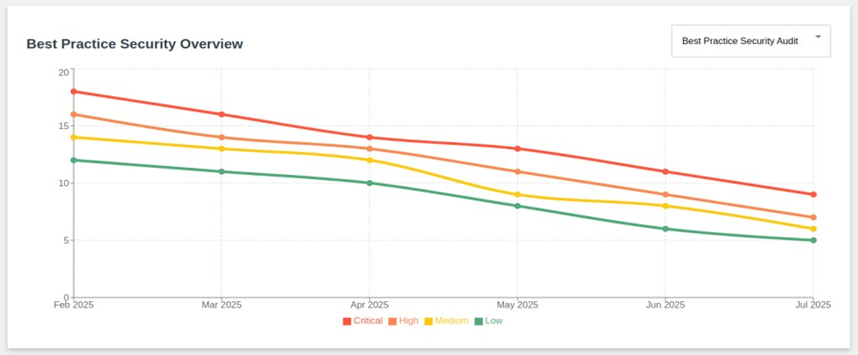
The Exposure page provides historical trend data across multiple domains:
- Best Practice Security
- Vulnerabilities
- Cisco PSIRT
- CIS Benchmarks
- PCI (severity and pass/fail)
- DISA STIG (including CAT breakdown)
- NIST 800-53
- Macro Segmentation
Key Benefits
- Track improvements over time
- Identify recurring issues
- Measure impact of remediation efforts