
The application automatically detects your browser's theme setting when you access it for the first time and applies the most appropriate theme. Once you have logged in, you can change the theme at any time, and your preferred setting will be remembered for future sessions.
First-Time Experience
When you open the application for the first time:
- The application checks your browser or operating system theme preference.
- The application automatically applies either:
- Dark Mode if your browser/device is configured for dark theme.
- Light Mode if your browser/device is configured for light theme.
- No manual setup is required.
Changing Your Theme
After signing in, you can switch between Dark Mode and Light Mode at any time.
To change your theme:
- Log in to the application.
- Navigate to the top-right corner of the screen.
- Locate the Theme Toggle beside the User Account dropdown menu.
- Select:
- Dark Mode for a darker interface.

- Light Mode for a brighter interface.

- Dark Mode for a darker interface.
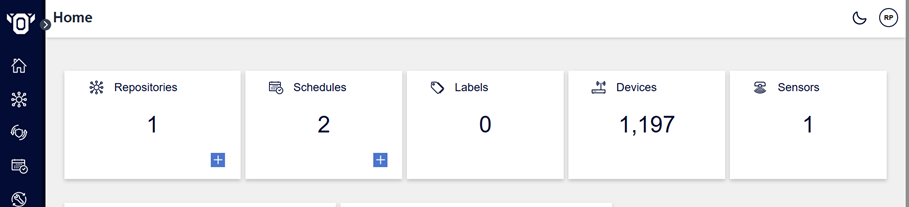
The selected theme is applied immediately throughout the application.
Theme Persistence
Your selected theme preference is automatically saved.
This means:
- Your chosen theme is remembered across sessions.
- The same theme will be applied whenever you return to the application.
- The theme remains consistent throughout all pages and features of the application.
Important: Theme preferences are stored locally on the device using browser local storage. If you sign in from a different device, browser, or a browser where the application's local storage has been cleared, your previously selected theme will not be available. In this case, the application will again use your browser's theme setting as the default, and you will need to reselect your preferred theme if required.