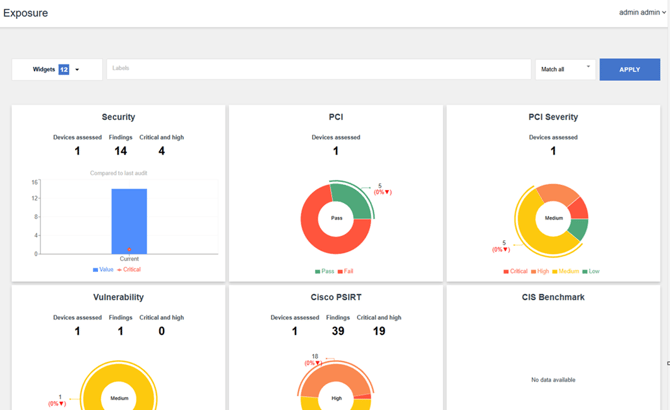
The Exposure page in Nipper OmniSight provides a high-level visual summary of your device assessment results. It is designed to help you quickly understand the overall security and compliance posture of your environment.
Key Capabilities
- At-a-glance insights into:
- Number of devices assessed
- Total findings
- Critical and high vulnerabilities
- Interactive dashboards covering:
- Vulnerabilities
- Compliance frameworks (CIS, PCI, DISA STIG, NIST 800-53)
- Vendor advisories (e.g., Cisco PSIRT)
- Trend analysis
- View how your security posture changes over time with 6-month trend charts
- Drill-down functionality
- Click any chart to navigate directly to detailed reports
Filtering Results
Use labels and match conditions to refine the data displayed:
- Match all – Shows results containing all selected labels
- Match any – Shows results containing at least one selected label
- Match exact – Shows results matching the exact label set
Apply filters to focus on specific devices, environments, or assessment scopes.
The Exposure page helps you:
- Quickly identify critical risks
- Monitor compliance status
- Track improvements or regressions over time
- Navigate efficiently to detailed device reports
For more information into these reports, please refer to What is the Exposure Page?